
Hosted Feature Branches: CI Pipeline Guide
By Eugen Yamamoto, Founder of CQUELLE

Understanding the Cost of Delayed Deployment with Hosted Feature Branches
After years of watching development teams tackle manual or semi-automated deployments, one lesson stands out: the hidden cost of a non-optimized pipeline isn’t always apparent upfront. With hosted feature branches, you can significantly reduce this gradual time drain. Each delay and incremental fix subtly chips away at productivity. Often, you only feel the impact when a tight deadline is approaching, and instead of pushing the project forward, you’re bogged down in troubleshooting.
I’ve experienced this myself. Facing an imminent release while dealing with build issues instead of progressing on features can be frustrating. Then, in one project, I thought I’d found the answer: a CI pipeline that could address these bottlenecks. But what I encountered was a basic two-step setup – QA followed by staging – where the team had limited access. It wasn’t the streamlined solution I’d expected.
Bridging the Gap: The Role of Hosted Feature Branches in Automation
This led me to an essential realization. For development teams striving to automate user solutions, one of the biggest hurdles is optimizing their own tools – creating frictionless workflows. Hosted feature branches emerged as the solution, offering a more streamlined pipeline with flexible, isolated environments. With this in mind, I prototyped a system that any team member could deploy and access on demand, saving both time and focus.
Why Hosted Feature Branches Are a Game Changer for CI/CD
Our approach transformed the CI/CD process: any branch, including feature branches, could now have its own hosted environment, instantly accessible via URL. Team members no longer had to wait for specific builds or worry about clashing deployments. Every Git branch became deployable to its unique URL, so testing and demoing became seamless. Shorter feedback loops meant more time for core issues, and the process became smoother and more intuitive. Our clients also benefited. With hosted feature branches, they could review live demo environments, interact with the builds, and provide timely feedback, which led to better collaboration and decision-making.
The Infrastructure Behind Hosted Feature Branches
Here’s a look at the infrastructure needed to set up hosted feature branches. We used proven CI tools like GitLab CI (Jenkins or GitHub Actions work, too), Docker for containerization, and a private registry. At the core of our setup is Kubernetes (K8s), our container orchestration platform. With K8s, we could deploy multiple branches in isolated environments, all hosted feature branches with dedicated URLs for easy access. To prevent conflicts between branches, we used Kubernetes namespaces, which allowed each branch to operate within its own unique space. Then, by integrating Kubernetes with our DNS, we automated the process with custom scripts – “K8s deployment extensions” – enabling each branch to be isolated and deployable at any time.
Hosted Feature Branches: Expanding the Possibilities
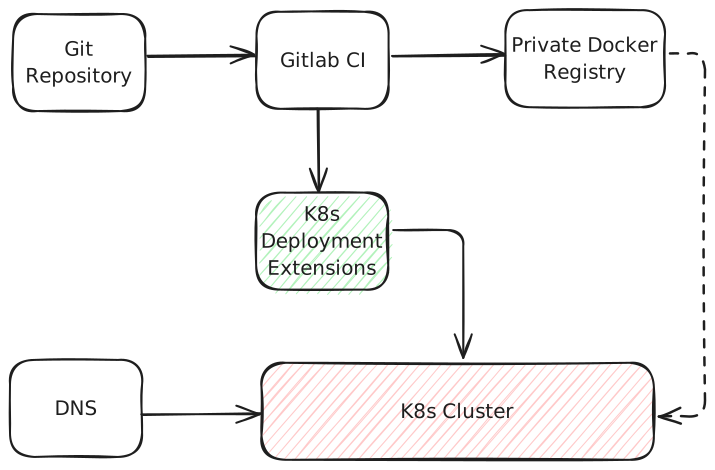
At CQUELLE, hosted feature branches have allowed us to streamline processes and deliver reliable results for our clients. Looking ahead, there’s potential to make this system available as a standalone product, especially as more teams see the benefits of hosted feature branches in their CI/CD pipelines. If you’re looking to improve your pipeline efficiency, this guide should help you take the first steps toward building a frictionless CI/CD system with hosted feature branches – so you can focus on the work that really matters.
Frequently Asked Questions
What is a hosted feature branch?
A hosted feature branch gives every Git branch its own deployed environment, instantly accessible via a unique URL. Instead of waiting for a shared QA or staging build, any team member can deploy and access a branch on demand. This lets developers, QA, and clients test and demo each branch in isolation without clashing deployments.
What infrastructure do you need to set up hosted feature branches?
Setting up hosted feature branches uses a CI tool such as GitLab CI, Jenkins, or GitHub Actions, Docker for containerization, and a private container registry. Kubernetes orchestrates the containers, with namespaces isolating each branch to prevent conflicts. Integrating Kubernetes with DNS, via custom deployment scripts, assigns every branch its own URL for on-demand access.
How do Kubernetes namespaces help with feature branch environments?
Kubernetes namespaces give each feature branch its own isolated space, preventing conflicts between branches deployed to the same cluster. Combined with DNS integration and custom deployment scripts, namespaces let multiple branches run simultaneously, each reachable at its own URL. This isolation is what makes on-demand, per-branch hosted environments practical.
How do hosted feature branches speed up development feedback loops?
Hosted feature branches shorten feedback loops by removing the wait for shared builds and the risk of clashing deployments. Each branch is testable at its own URL the moment it is pushed. Clients and QA can review live environments, interact with builds, and give timely feedback, leaving developers more time to focus on core issues.