
Kubernetes Architecture Explained: A Practical Guide
By Eugen Yamamoto, Founder of CQUELLE
What Makes Kubernetes Architecture Worth Understanding
Most Kubernetes tutorials teach you how to write YAML and run kubectl apply. Very few explain why the system works the way it does. That gap becomes a problem the moment something breaks in production and you are staring at a crashlooping pod with no idea which component is responsible.
Understanding Kubernetes architecture is not academic — it is the difference between debugging a cluster issue in 5 minutes versus 5 hours. This guide goes beyond component definitions. It explains how the pieces interact, where failures actually occur, and what production-grade clusters look like in the real world.
The Big Picture: Control Plane and Worker Nodes
A Kubernetes cluster is split into two layers: the control plane (the brain) and worker nodes (the muscle). The control plane decides what should run and where. Worker nodes do the actual running.
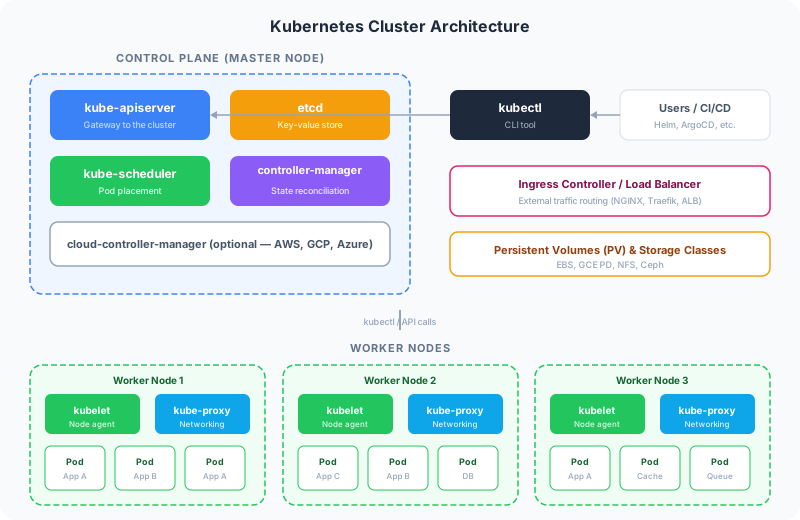
This separation is fundamental. The control plane never runs your application containers (in production). Worker nodes never make scheduling decisions. This clean boundary is what makes Kubernetes resilient — you can lose a worker node and the control plane will reschedule its pods elsewhere within seconds.
Control Plane Components: The Brain of the Cluster
kube-apiserver: The Single Entry Point
Every interaction with a Kubernetes cluster — whether from kubectl, a CI/CD pipeline, or an internal controller — goes through the API server. It is the only component that talks directly to etcd. Everything else communicates through it.
The API server handles:
- Authentication — validating who you are (certificates, tokens, OIDC)
- Authorization — checking what you are allowed to do (RBAC policies)
- Admission control — enforcing policies before objects are persisted (resource quotas, security policies, webhook validations)
- Validation — ensuring the object spec is well-formed
Production insight: The API server is the most common bottleneck in large clusters. If you are running 100+ nodes, consider running multiple API server replicas behind a load balancer and tuning the --max-requests-inflight and --max-mutating-requests-inflight flags.
etcd: The Source of Truth
etcd is a distributed key-value store that holds the entire state of your cluster — every pod, service, secret, and config map. When you run kubectl get pods, the API server reads from etcd. When you create a deployment, the API server writes to etcd.
Why this matters in production:
- etcd is a consensus-based system (Raft protocol). It requires a quorum — meaning 3 or 5 nodes in production, never 2 or 4
- Write latency in etcd directly affects cluster responsiveness. Use SSD storage, not spinning disks
- etcd is the single most critical component to back up. Without it, your cluster state is gone
- Keep etcd on dedicated nodes, separated from the API server workload in large clusters
A common mistake: Running etcd on the same disk as application workloads. When disk I/O spikes, etcd latency increases, the API server becomes slow, and the entire cluster feels sluggish — even though the issue has nothing to do with your application code.
kube-scheduler: Where Should This Pod Run?
When a new pod is created, it starts in a "Pending" state with no node assigned. The scheduler watches for these unassigned pods and decides which worker node is the best fit.
The scheduling decision is a two-phase process:
- Filtering — eliminates nodes that cannot run the pod (insufficient CPU/memory, taints, node selectors, affinity rules)
- Scoring — ranks remaining nodes by preference (least loaded, matching topology, existing image cache)
Production patterns:
- Use resource requests and limits on every pod. Without them, the scheduler has no data to make intelligent decisions
- Use pod anti-affinity to spread replicas across nodes. Do not run all replicas of your API server on the same node
- Use topology spread constraints to distribute pods across availability zones
topologySpreadConstraints:
  - maxSkew: 1
    topologyKey: topology.kubernetes.io/zone
    whenUnsatisfiable: DoNotSchedule
    labelSelector:
      matchLabels:
        app: api-server
kube-controller-manager: The Reconciliation Engine
The controller manager runs dozens of control loops that continuously compare the desired state (what you declared in YAML) with the actual state (what is running in the cluster). When they diverge, the controller takes action.
Key controllers include:
- ReplicaSet controller — ensures the correct number of pod replicas are running
- Deployment controller — manages rolling updates and rollbacks
- Node controller — detects when nodes go offline and marks them as NotReady
- Service account controller — creates default service accounts for new namespaces
- Job controller — ensures batch jobs run to completion
The mental model: Kubernetes is not imperative ("run this container"). It is declarative ("I want 3 replicas of this container running"). The controller manager is the mechanism that makes declarative infrastructure work. It is a perpetual reconciliation loop.
cloud-controller-manager: The Cloud Bridge
If you are running Kubernetes on AWS, GCP, or Azure, the cloud controller manager handles cloud-specific operations:
- Provisioning load balancers when you create a Service of type LoadBalancer
- Attaching persistent disks (EBS volumes, GCE PDs) to nodes
- Managing node lifecycle events (instance termination, zone failures)
On managed Kubernetes services (EKS, GKE, AKS), the cloud provider handles this component for you. If you are running self-managed clusters, you need to install the appropriate cloud controller.
Worker Node Components: Where Your Code Actually Runs
kubelet: The Node Agent
The kubelet runs on every worker node. It is responsible for:
- Receiving pod assignments from the API server
- Pulling container images from the registry
- Starting and stopping containers via the container runtime (containerd)
- Reporting node status and resource usage back to the control plane
- Running liveness probes (is the container alive?) and readiness probes (is it ready to receive traffic?)
Critical production detail: If the kubelet crashes, the control plane loses visibility into that node. Pods continue running (they are managed by the container runtime), but no new pods can be scheduled and health checks stop. This is why kubelet is typically managed as a systemd service with automatic restart.
kube-proxy: The Network Plumber
kube-proxy maintains network rules on each node that enable Service abstraction. When you create a Kubernetes Service, kube-proxy ensures that traffic sent to the Service's ClusterIP is forwarded to a healthy pod backing that service.
Modern kube-proxy operates in IPVS mode (not iptables) for better performance at scale. IPVS uses hash-table-based routing instead of sequential iptables rules, which matters when you have thousands of services.
Container Runtime: containerd
Kubernetes no longer uses Docker directly (Docker support was removed in v1.24). Instead, it uses containerd — the same container runtime that Docker itself uses under the hood. You gain the same container execution without the Docker daemon overhead.
How a Pod Goes From YAML to Running Container
Understanding the request flow reveals how the components interact.
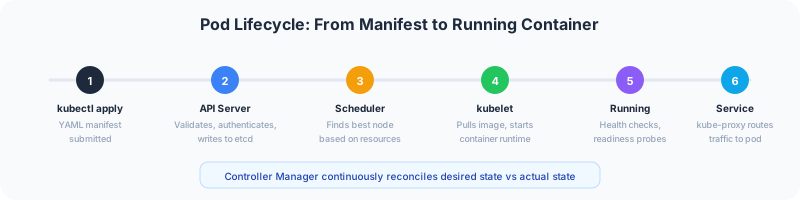
- You run
kubectl apply -f deployment.yaml - kubectl sends the request to the API server
- The API server validates and authenticates the request, then writes the desired state to etcd
- The Deployment controller notices the new Deployment and creates a ReplicaSet
- The ReplicaSet controller creates Pod objects (still unscheduled)
- The scheduler finds the best node for each pod and updates the pod spec in etcd
- The kubelet on the assigned node detects the new pod, pulls the container image, and starts the container
- kube-proxy updates network rules so the pod can receive traffic through its Service
This entire process takes seconds in a healthy cluster. Each component only watches for its own responsibility and acts when relevant state changes occur — this is the watch-and-react pattern that makes Kubernetes efficient.
Networking: The Part Most People Get Wrong
Kubernetes networking follows three fundamental rules:
- Every pod gets its own IP address — no NAT between pods
- All pods can communicate with all other pods without NAT (across nodes)
- Services provide stable endpoints for groups of pods
How Service Discovery Works
Kubernetes provides two mechanisms for service discovery:
DNS (preferred): CoreDNS runs in the cluster and creates DNS entries for every Service. A service called api in namespace production is reachable at api.production.svc.cluster.local.
Environment variables: When a pod starts, Kubernetes injects environment variables for every Service in the same namespace. This is simpler but does not handle services created after the pod starts.
Ingress: Routing External Traffic
An Ingress resource defines rules for routing HTTP/HTTPS traffic from outside the cluster to Services inside it. Popular Ingress controllers include:
- NGINX Ingress — the most widely used, battle-tested
- Traefik — automatic HTTPS via Let's Encrypt, good for smaller clusters
- AWS ALB Ingress — integrates directly with Application Load Balancers on EKS
- Istio Gateway — if you are already using a service mesh
Network Policies: The Firewall You Probably Need
By default, every pod can talk to every other pod. This is fine for development. In production, it is a security risk. Network Policies let you define exactly which pods can communicate with which other pods.
apiVersion: networking.k8s.io/v1
kind: NetworkPolicy
metadata:
  name: api-allow-frontend-only
spec:
  podSelector:
    matchLabels:
      app: api
  ingress:
    - from:
        - podSelector:
            matchLabels:
              app: frontend
      ports:
        - port: 8080
Important: Network Policies require a CNI plugin that supports them. Calico, Cilium, and Weave Net support Network Policies. Flannel does not.
Production Best Practices
Resource Management
Set resource requests and limits on every container. Requests determine scheduling; limits prevent runaway containers from consuming all node resources.
resources:
  requests:
    cpu: 250m
    memory: 256Mi
  limits:
    cpu: 500m
    memory: 512Mi
Pro tip: Set requests based on your P50 usage and limits at 2x requests. Use the Vertical Pod Autoscaler (VPA) in recommendation mode to discover actual resource consumption before setting values.
Health Checks: Not Optional
Configure three types of probes:
- Startup probe — gives slow-starting containers time to initialize (Java apps, large ML models)
- Liveness probe — restarts the container if it is deadlocked or unresponsive
- Readiness probe — removes the pod from Service endpoints if it is not ready to serve traffic
startupProbe:
  httpGet:
    path: /healthz
    port: 8080
  failureThreshold: 30
  periodSeconds: 10
livenessProbe:
  httpGet:
    path: /healthz
    port: 8080
  periodSeconds: 15
  timeoutSeconds: 5
readinessProbe:
  httpGet:
    path: /ready
    port: 8080
  periodSeconds: 5
Namespace Strategy
Use namespaces to separate environments and teams:
production,staging,development— environment separationteam-payments,team-platform— team-based isolation- Apply ResourceQuotas per namespace to prevent one team from starving others
- Apply LimitRanges to set default resource requests for pods that do not specify them
Secrets Management
Kubernetes Secrets are base64-encoded, not encrypted. For production, use one of these approaches:
- External Secrets Operator — syncs secrets from AWS Secrets Manager, HashiCorp Vault, or GCP Secret Manager into Kubernetes
- Sealed Secrets — encrypts secrets that can be safely stored in Git
- SOPS with Age/KMS — encrypts secret values in YAML files, decrypts at apply time
Never commit plain Kubernetes Secret manifests to Git.
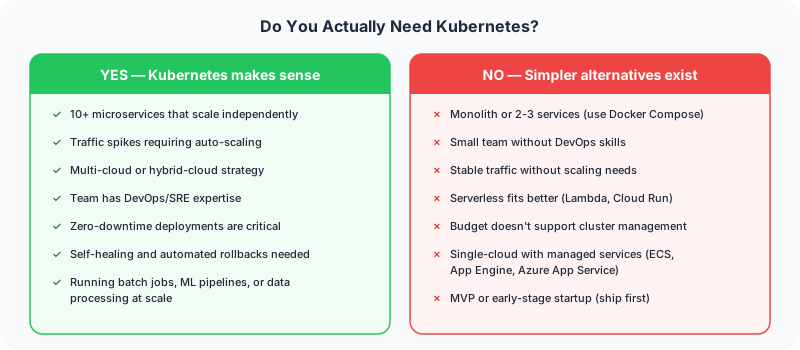
Do You Actually Need Kubernetes?
Kubernetes is powerful but complex. Before adopting it, ask whether the operational overhead is justified by your actual requirements.
The Managed Kubernetes Middle Ground
If you need Kubernetes but do not want to manage the control plane, managed services remove significant operational burden:
- Amazon EKS — most mature, deepest AWS integration, largest ecosystem
- Google GKE — best developer experience, Autopilot mode manages nodes too
- Azure AKS — strong enterprise integration, free control plane
With managed Kubernetes, the cloud provider handles control plane availability, etcd backups, API server scaling, and version upgrades. You manage worker nodes and workloads.
Common Pitfalls We See in Production
After deploying Kubernetes for clients across healthcare, fintech, and enterprise platforms, these are the mistakes we encounter most often:
- No resource requests — the scheduler cannot make intelligent decisions, pods get evicted under pressure
- Missing health checks — crashed containers keep receiving traffic because Kubernetes does not know they are dead
- Single-replica deployments — defeats the entire purpose of orchestration. Run at least 2 replicas for anything that matters
- Ignoring Pod Disruption Budgets — node drains during maintenance take down all replicas simultaneously
- Over-provisioning — running 3-node clusters with each node at 10% utilization. Right-size your nodes or use cluster autoscaler
- No Network Policies — every pod can talk to every other pod, including your database
- Storing state in pods — pods are ephemeral by design. Use PersistentVolumes for data that must survive restarts
Next Steps
Kubernetes architecture is a deep topic, but you do not need to master every detail before getting started. Focus on understanding the control plane, how scheduling works, and how networking connects your services. The rest you will learn through practice.
If you are planning to containerize your application or migrate an existing system to Kubernetes, having an experienced team matters. Misconfigurations in production clusters are expensive to debug and can impact availability.
At CQUELLE, we help teams architect, deploy, and manage Kubernetes-based infrastructure. Whether you are planning your first cluster or optimizing an existing one, reach out to discuss your project.
Frequently Asked Questions
What is the difference between the Kubernetes control plane and worker nodes?
A Kubernetes cluster is split into two layers. The control plane is the brain — it decides what should run and where, but it does not run your application containers in production. Worker nodes are the muscle — they run the actual containers but never make scheduling decisions. This separation lets the control plane reschedule a failed worker node's pods elsewhere within seconds.
What does the kube-apiserver do in Kubernetes?
The kube-apiserver is the single entry point to a Kubernetes cluster. Every interaction — from kubectl, CI/CD pipelines, or internal controllers — goes through it, and it is the only component that talks directly to etcd. It handles authentication, authorization via RBAC, admission control, and validation. In large clusters it is the most common bottleneck, so it is often run as multiple replicas behind a load balancer.
Why does etcd need an odd number of nodes in production?
etcd is the distributed key-value store that holds the entire state of a Kubernetes cluster — every pod, service, secret, and config map. Because it uses the Raft consensus protocol, it requires a quorum to agree on writes. That means running 3 or 5 nodes in production, never 2 or 4. etcd is also the single most critical component to back up, since losing it loses your cluster state.
Does Kubernetes still use Docker as its container runtime?
No. Kubernetes removed Docker support in version 1.24 and now uses containerd, which is the same runtime Docker itself uses under the hood. You get the same container execution without the overhead of the Docker daemon. On each worker node, the kubelet starts and stops containers through containerd.
Do you actually need Kubernetes for your application?
Not always. Kubernetes is powerful but operationally complex, so you should weigh that overhead against your real requirements before adopting it. If you need Kubernetes but do not want to run the control plane yourself, managed services like Amazon EKS, Google GKE, and Azure AKS handle control plane availability, etcd backups, API server scaling, and version upgrades, leaving you to manage worker nodes and workloads.