

AI in Software Development: Setup Beats Model
By Eugen Yamamoto, Founder of CQUELLE

Most teams use AI in software development the same way: a chat tab open next to the editor. You ask for a function, you get one, you copy it, paste it into the project, and wire it up by hand. That works — it is where everyone starts, and it is where most teams stop. We stopped about a year ago.
Today our AI works *inside* the repository. It reads the code, edits the files, runs the tests, and checks its own work before it tells us a feature is done. The model is the same one you would open in a browser tab. What changed is the setup around it.
This is a practical account of how a small team actually ships with AI agents — not a forecast, and not a tool roundup. The running example is a real project: a multi-tenant cloud platform for managing scientific instruments, with a .NET backend and a Next.js + React frontend, built using Claude Code.
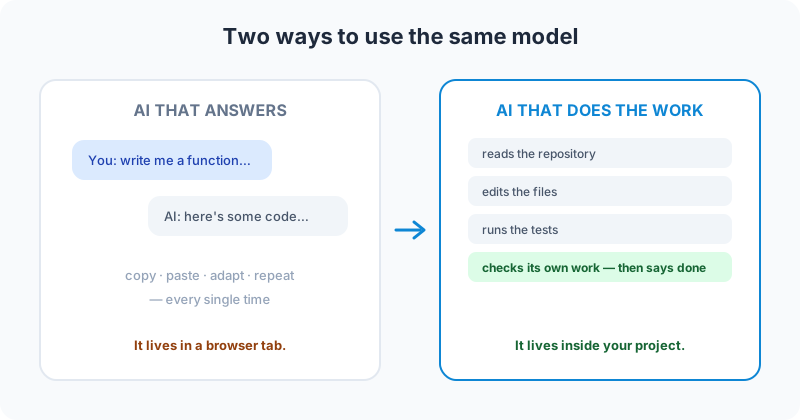
From AI that answers questions to AI that does the work
The whole change fits in one sentence: we moved from AI that *answers questions* to AI that *does the work*.
In the first mode, the AI is a very fast reference. You hold the project in your head and it hands you snippets. In the second, the AI holds the project too — it opens your files, makes the edits, runs the build, and clicks through the result in a browser. You stop being the courier between the chat window and the codebase.
Nothing about the model is different. It is the same Claude we used in the browser. This style of running it has a name now — agentic coding — but the name matters less than the setup behind it: an agent with access to the real files, the real tests, and the real tools, plus a set of rules telling it how this particular team builds.
What AI in software development builds in one request
When we ask for a feature, the request lands on every layer at once. A single prompt produces the database change, the backend logic, the API, the matching frontend, and the tests that prove it — roughly eight layers deep, backend and frontend in one pass, with no copy-paste between them.
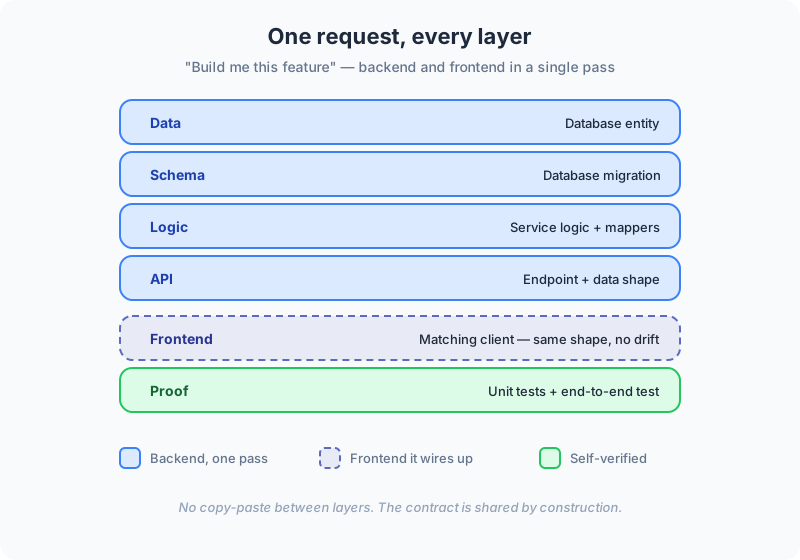
Here is a real one. We needed a notes field on a device, so we ran our build-feature skill:
/feature Add an optional free-text notes field to a Device (max 500 chars).
Organization admins can set it when registering or editing a device.
Everyone in the org can see it on the device detail screen. It must never be logged.
About ten minutes later it was done. Not "drafted" — done. It had added the database column and a migration, the mappers (with the field flagged so it stays out of the audit log, because we said it must never be logged), the service logic, the API endpoint and its data shape, and the matching React client. Then it wrote unit tests at several layers and an end-to-end test: it opened a browser, logged in, typed a note, saved, reopened the device, and confirmed the text was still there.
Our job was to review it. That is the honest division of labour now: we read the diff and check the behaviour, but we do not type the wiring.
The team rules it follows before writing a line
Before it writes anything, the agent re-reads the team's rulebook. The things a new hire takes months to absorb get applied on every single task:
- Tenant data stays separate. One organization can never see another's data — enforced on every query it writes.
- The architecture stays layered. Code lands in the right place, in the right order: the API calls into services, services into the data layer, never the reverse.
- Naming stays consistent. API names follow our conventions, so the codebase reads as if one person wrote it.
None of this is new. It is what a careful senior developer does by habit. The change is that it now happens automatically, the same way, every time — including at 6 p.m. on a Friday.
How the AI checks its own work before "done"
This is the part that makes the rest safe. An AI will happily produce code that *looks* right — plausible functions, realistic-looking tests — and isn't. If you read it without checking, you will believe it works. So before the agent is allowed to say "done", it runs the team's quality gate:
✓ backend compiles
✓ backend tests pass
✓ frontend type-checks
✓ frontend tests pass
✓ custom rule checks pass
▸ all green — done
If any line comes back red, the task is not finished. The agent goes back, fixes it, and runs the gate again. Behind that gate sits a longer pre-flight checklist — 22 checks across six groups (right place, security and isolation, correctness, wiring, proof, and same-turn companions) — plus a flat list of 29 things it is never allowed to do. Those numbers grew over time, one hard-won rule at a time.
AI-powered code review: a second pair of eyes
The quality gate catches what is mechanical. For the rest, we use AI-powered code review — a set of review agents that each start in a fresh context, with no memory of why the code was written the way it was. That blank slate is the point: a reviewer that did not write the code argues with it more honestly than one that did.
Each reviewer hunts for one kind of quiet, expensive bug:
- A tenant data leak — a query that would let one organization read another's records.
- A secret or personal value in the logs — sensitive data written somewhere it could be read later.
- Backend and frontend drifting apart — a data shape that changed on one side but not the other.
These are the bugs that pass a casual read and surface in production three weeks later. When a reviewer flags something, the building skill fixes it and the gate runs again. It costs more tokens to have one agent do the work and another tear it apart, but it is far cheaper than the production incident it prevents.
From one sentence to a tracked milestone
The same approach works above the code. A throwaway sentence — "let admins add a short note to a device" — becomes a proper engineering story: who it is for, acceptance criteria, the layers it touches, ready to implement, filed where the team already plans.
It scales up, too. We hand it a large initiative and it proposes a set of small, ordered stories. For this project, a measurement-sync milestone came back as seven stories and a data-integrity milestone as five. We decide the cut; the AI's value is spotting the dependencies between stories so we do not block ourselves two steps later.
The setup matters more than the model
Here is the reframe worth keeping: everything above runs on the same AI you can open in a browser. The advantage is not a smarter model — it is the scaffolding around it.
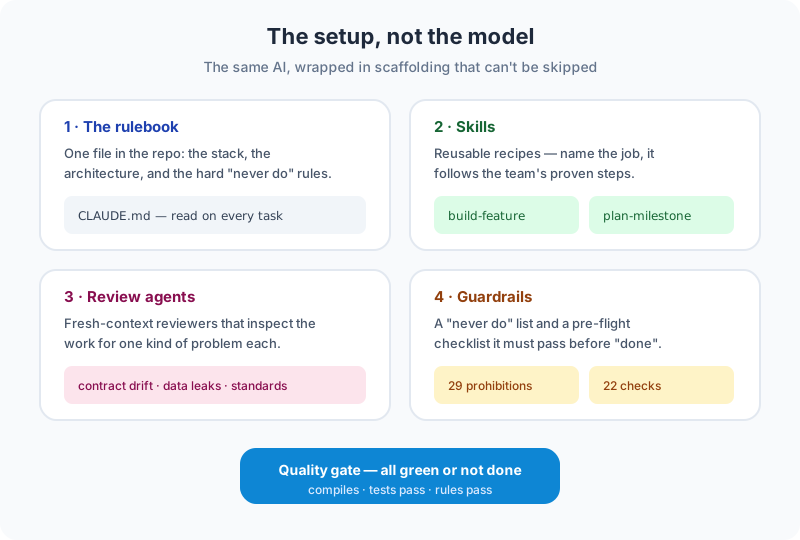
Four pieces do the work:
- The rulebook. One file in the repository (
CLAUDE.md) states the stack, the architecture, and the hard "never do" rules. It sits next to the code, so the rules travel with the project and every team member — human or AI — reads the same one. - Skills. Reusable recipes. Name the job —
build-feature,plan-milestone— and the agent follows the team's proven steps instead of improvising. - Review agents. The fresh-context reviewers described above.
- Guardrails. The prohibitions and the pre-flight checklist that cannot be skipped on the way to "done".
All of it is plain text, versioned in git, and reviewed like code. It is a living document: most weeks we change something because we found a sharper way to say it. And because the agent can reach other systems through MCP connections, the same setup runs work outside the editor. This article's keyword research, for instance, was pulled from our SEO tooling and turned into draft tasks on our board without anyone opening those dashboards by hand.
Where AI in software development still needs a human
It is not autonomous, and pretending otherwise is how teams get burned. The closest analogy is a self-driving car: you are not touching the engine, but you have to watch the road — and you have to be *ahead* of it.
A few honest limits we hit regularly:
- It needs supervision. Left alone on a vague task, it drifts. Our job shifted from writing code to steering: setting the boundaries up front, then verifying the result does what we asked rather than what it looks like.
- It can miss connections a human in the weeds would catch. On one scheduling feature, supply and demand should have shared a single vehicle-type contract. One side was strongly typed; the other was a loose string. The model could not see the two were the same thing and got stuck — so it asked. A junior developer would have done the same. We told it: one contract, both sides. Done.
- Refactors leave dead code behind. It is the thing we most often catch in review.
These are real costs. They are also smaller than the cost of hand-wiring every layer, which is why the trade keeps paying off.
What this changes in your software development process
Three things change. Speed: a full feature in one pass instead of a week of plumbing. Consistency: the team's rules, applied identically every time. And fewer quiet bugs, caught before they ship.
What does not change: you decide what to build and why. People approve; the AI proposes. Your standards set the bar — the rulebook is yours to write, and it is only as good as the judgment you put into it.
The shape of our client work has shifted because of this. Most teams no longer ask us to build from a blank page. They bring a working prototype — often something they generated themselves — and ask us to make it real: tested, and safe to run in production. The conversion from prototype to production software is where the engineering still lives.
How to start using AI in software development today
If your team is still in the browser-tab phase, you do not need our whole setup to begin. Three steps, in order:
- Open it in one repository. Point the agent at a single real project instead of a chat tab, and let it read the code.
- Write one page of rules. A short "here is how we build, here is what you may never do." Start with three rules, not thirty.
- Add one check. Make it run your tests before it is allowed to say done. Grow the gate from there.
That is the entire on-ramp. The rulebook and the gate are what turn a fast autocomplete into something you can trust with a feature.
If you want to talk through where this fits your own codebase — a new build or an existing one — get in touch, or read how a dedicated team from CQUELLE plugs into your process. If you are weighing whether to build in-house or with a partner, our guide to custom software development services lays out the trade-offs.
Frequently Asked Questions
What does "AI in software development" mean beyond using a chatbot?
AI in software development ranges from a chat assistant that suggests code in a browser to an agent that works directly in your repository — reading files, editing them, running tests, and reviewing its own output before a feature is marked done. The second mode uses the same model as the first; the difference is the surrounding setup of rules, reusable skills, and automated checks.
Is AI-generated code safe to use in production?
AI-generated code is safe to ship only with verification, because models can produce plausible code and realistic-looking tests that do not actually prove anything. We run every change through an automated quality gate — it must compile, pass tests, and pass custom rule checks — plus fresh-context review agents that look for tenant data leaks, secrets in logs, and contract drift between backend and frontend. A human reviews the result before it ships.
Can you add AI agents to an existing codebase, or only new projects?
Yes, AI agents work on existing codebases, not just greenfield projects. The agent reads the current code as context, and the same rulebook-and-review approach applies. It is a step-by-step process and every codebase is different, but integrating AI into an existing project is not a blocker in our experience.
Does AI in software development replace developers?
No. It changes what developers spend time on. Routine work — wiring layers together, boilerplate, repetitive tests — gets automated, while people make the product and architecture decisions, steer the agent, and verify the result. The analogy we use is a self-driving car: you are not turning the engine, but you decide where to go and keep watching the road.
How much does an AI coding setup like this cost?
The subscription tier we use runs roughly EUR 100-120 per developer per month, which covers far more usage than a typical day requires; we rarely hit the limits except during heavy work like a large migration. The bigger investment is the time spent building and maintaining the rulebook, skills, and review agents — but that is written once and reused on every task.